Writing
Teaching
## Network Forensics ### 6[84]45 Week 5 --- ### What is a packet? * A chunk of data, forming part of a complete payload * Max packet size is about 64KB * Usually 1500 bytes (MTU size) * What happens when you stream a movie? Notes: i.e. HLS (HTTP Live Streaming) uses adaptive bitrates to provide video chunks of different video qualities. Regardless, at the end of the day, the data is split into many, many packets -- ### What's in a packet * Packets contain a header and a payload * Header contains metadata * e.g. size * e.g. source * e.g. destination * Payload is all the data * Encapsulated PDUs (Protocol Data Unit) Notes: Q: Why is a header important? A: It tells us the type of the PDU - like magic bytes in a file! --- ### OSI 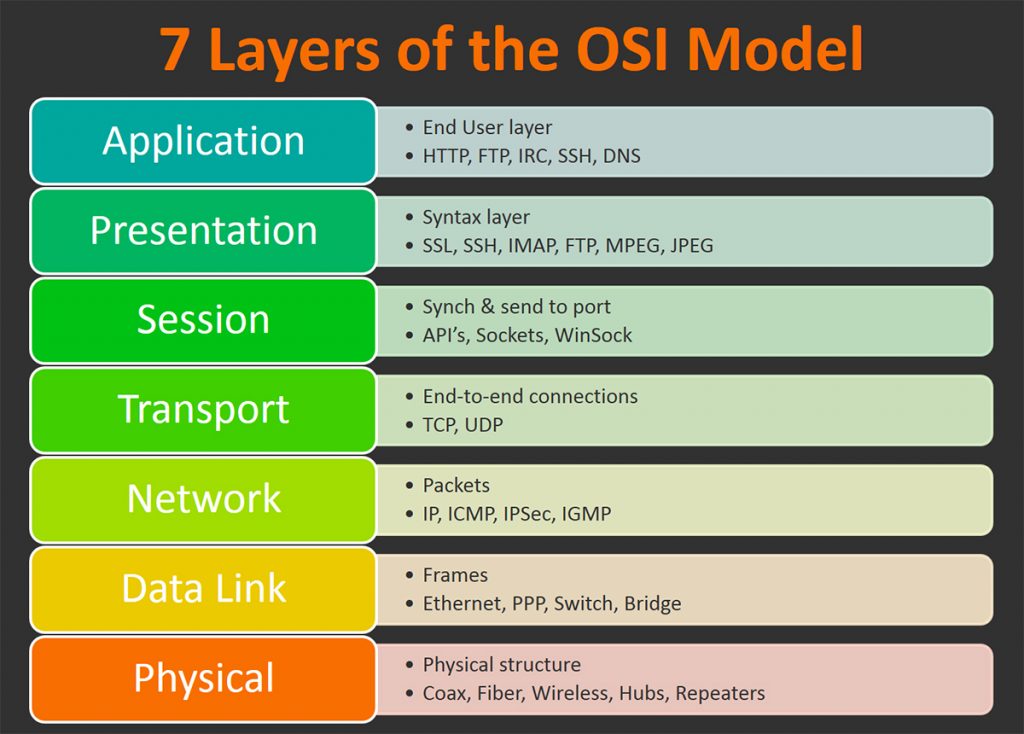 Notes: We will inspect the packets in a demo on a later slide --- > blah blah blah networks. Routing, hops... MAC... IP addresses, DNS, domains, ports... TCP, UDP... HTTP, HTTPS, paths, headers... Notes: This isn't a networking course, but ideally student should be familiar with some networking concepts. At the very least, hopefully they know of: MAC Addresses, IP Addresses, DNS / Domains, HTTP(S) --- ### Packet capture > Intercepting Layer 2 traffic, and storing them into a Packet CAPture file (PCAP) * Encapsulation * What about layer 1 traffic? Notes: Usually we don't have access to the layer 1 (physical) data (have fun trying to actually capture electricity or light!) -- > Demo * Visit a [website](http://xcal1.vodafone.co.uk/) * Download a [file](http://212.183.159.230/512MB.zip) * Watch a video Notes: * Start Wireshark ahead of time. * Visit a website (ideally not a HTTPS), and download some file. * Maybe go to YouTube What do we see? Analyse the contents of one packet and point out its contents --- ### Analysing traffic with Wireshark -- ### Display Filters * Boolean expression (similar to C) * `(___ eq AAA && ___ ne BBB) || f_3` * You can search by * MAC (e.g. `eth.addr`) * Protocol (e.g. `http`) * IP (e.g. `ip.src_host` and `ip.dst_host`) * And a bunch more: [here](https://wiki.wireshark.org/DisplayFilters) and [here](https://www.wireshark.org/docs/wsug_html_chunked/ChWorkBuildDisplayFilterSection.html) -- ### Conversations Packets can be tied to a "conversation" * You can follow them by * Right clicking a packet > `follow X stream` * Filtering for `X.stream eq N` > `X` would be `TCP` or `UDP` > `N` would be a number Notes: Conversation meaning a series of packets of the same connection -- ### Analysing Wireshark traffic * Who * What * When * Where Notes: Go over some ways to use Wireshark For example, isolating traffic by a given IP address Or filtering for content What about figuring out the nature of the data... like time, size, etc Q: Who are we? How do we do find out what _our_ IP address is? -- ### Encrypted Traffic Some traffic will be encrypted (e.g. SSH, HTTPS)... how do we read these? > We need the encryption keys -- ### Encrypted Traffic If you have them though... e.g. `SSLKEYLOGFILE` * Edit > Preferences * Protocols > TLS > There you can you set the TLS / SSL keys to decrypt the traffic -- ### HTTP/2 > [youtu.be/weT02x9R7wk](http://youtu.be/weT02x9R7wk) Notes: Students can follow on their own. Notably, HTTP/2 is split into multiple "Header" and "Data" frames, all associated with a given stream. Wireshark doesn't have that many HTTP/2 features. Generally you'd filter by `http2`, like `http2.header or http2.data.data`. As well as by hostname (known as `http2.header.authority`) --- ### Where to perform a packet capture? * Computers, devices * Network infrastructure * literally anywhere™️ Notes: Port mirroring, SPAN -- ### Challenges when packet capturing * Is packet capturing enabled (time)? * What packets are captured (scope)? * How many packets are captured (size)? Notes: * Packets aren't stored on the disk, we can't just _retrieve_ them unless they're intentionally captured... * Is your device receiving the packets? * There's a lot of data that goes through a network... capturing 24/7 would be too massive.. --- ### Packet Routing -- * Layer 3 - Network - IP address * Layer 2 - Data Link - MAC address * Packets end up traversing across layer 2 networks * ARP: IP -> MAC resolution * ARP tables (which switch port has which MAC) -- 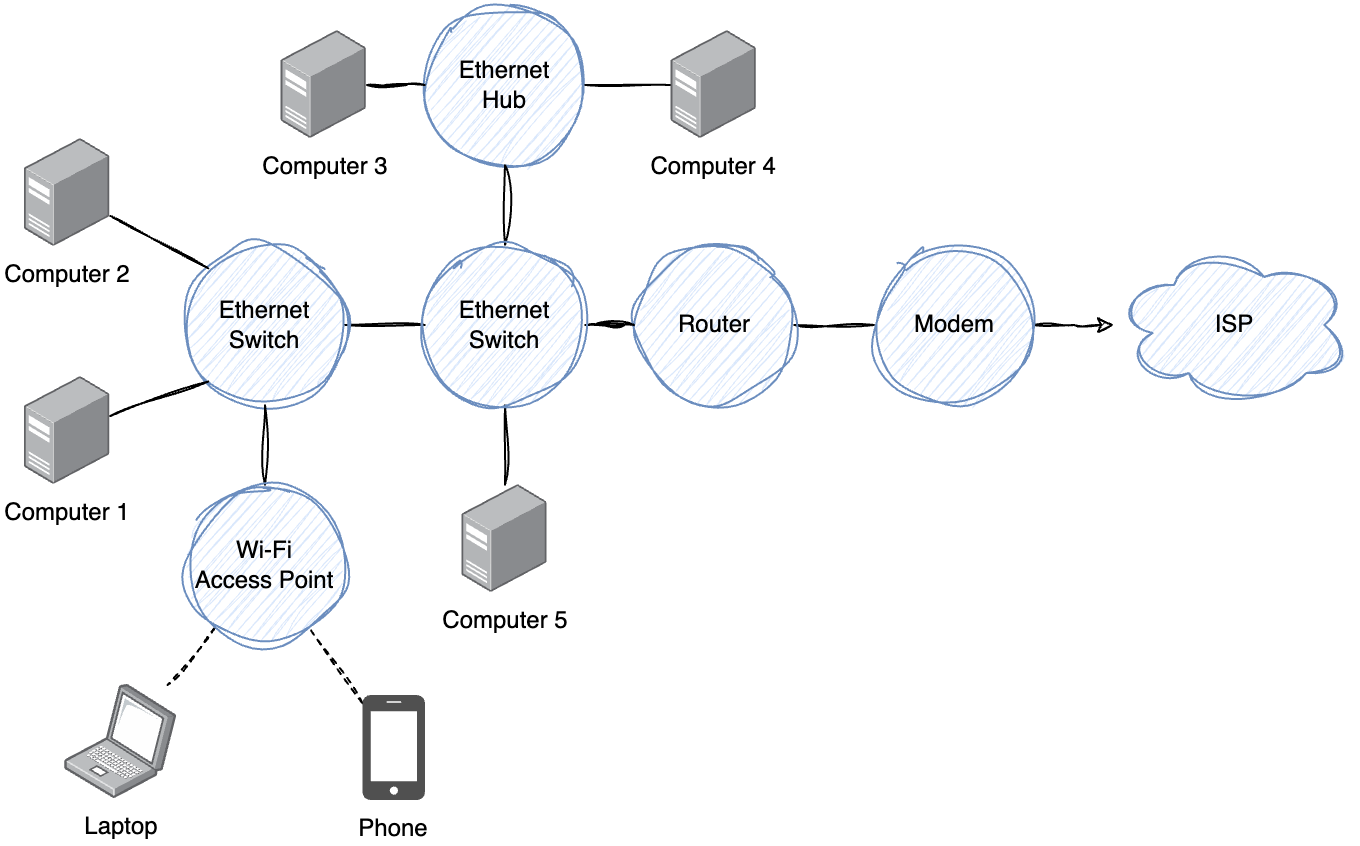 Notes: * What are these network devices, how do they differ? * Where is traffic emitted from one device visible? * Switches vs Hubs vs APs? -- > Packets only travel where needed * Switches do not emit packets on all ports * Packet capturing on a computer connected a network switch * Probably won't see other device traffic.. -- ### Summary > It's important to know where a packet capture was "tapped" from. * Where should I tap from to * Capture just my device's traffic? * Capture all WAN (internet) traffic from my network * Capture traffic between two computers * Capture Wi-Fi traffic? Notes: * Capture just my device's traffic? - Your device * Capture all WAN (internet) traffic from my network - Router, firewall, anything in the path of the internet * Capture traffic between two computers - Probably the switch * Capture Wi-Fi traffic of a device - A device connected to the same AP, or switch --- ### Legal Implications > Am I allowed to capture packets? * Do you have permission? * Workplace monitoring * Privacy * Identification --- ## Other Analysis Tools? * There are some online sites * But should you be uploading them there? * TShark (CLI) * https://github.com/xplico/CapAnalysis --- ### Extended: Cloud Forensics * Ask your vendor * Application logs * Traffic flow logs