Writing
Teaching
# week04 ### Memory Forensics ### Questions? --- ## Whoami - Jesse Merhi (Like that herb + "he") - Product Security @ Atlassian - I like hacking and AI/machine learning, talk to me about them. -- ## In saying that.. - If any of you want some advice regarding career things, then... -- ## how to contact me - Me: z5312498@ad.unsw.edu.au - Admins are: cs6445@cse.unsw.edu.au - [@Merhi]() on the SecSoc Discord (pls join) - [https://secso.cc/discord](https://secso.cc/discord) -- # Admin Things - Reminder Report 1 is due this Sunday - Also Week 4 and 5 challenges are now out (both due end of Week 5 / 19th October) --- ### Memory * Not everything is stored on a disk * Why Notes: Writing to secondary storage is expensive. Consider the time it takes to write to a secondary drive For fun, you could show a standard PC motherboard / diagram and point to the [south bridge](https://www.google.com/url?sa=i&url=https%3A%2F%2Fen.wikipedia.org%2Fwiki%2FSouthbridge_%2528computing%2529&psig=AOvVaw2RCP3zkAmYzGeCww7XAAd0&ust=1759751742225000&source=images&opi=89978449). The critical path for a secondary drive is long! --- ### What's in the memory * Application data * The application itself * Operating system data * Networking data Notes: Some points to note * Passwords * Content on the screen! * Registry * The CPU can't just execute CPU instructions directly from a secondary drive * It first needs to copy over the data from the secondary drive to a primary memory device (RAM), and then into the CPU's own registers (think of the CPU's fetch-execute cycle) --- ### Memory Forensics * We can find remnants of data in memory * Some malware never touches the disk --- ### What could you find in memory? * Recently executed commands * Running processes, and their code / library * Drivers & daemons * Passwords, keys, security stuff > Why? Notes: Again, noting that alot of things exist in the memory, because the CPU requires things to be in memory in order to use them. --- ### Fileless Malware * Even if it never touches the disk... * ... at some point, it has to be in memory * Process Hollowing * When a legitimate process is paused, duplicated, and its executable memory is replaced with malicious code * This can bypass simple AVs which ignore whitelisted/trusted services > read more [here](https://www.trellix.com/en-au/security-awareness/ransomware/what-is-fileless-malware.html) and [here](https://www.crowdstrike.com/cybersecurity-101/malware/fileless-malware/) -- 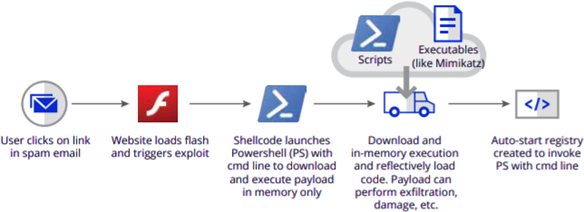 --- ### Collecting memory dumps * RAM is _volatile_, you can't capture it after the computer is shutdown* * It can be hard to collect when it's live * You don't want to change the machine's state Notes: There are some high-tech forensic methods to pull data off RAM that is shutdown by analysing residual energy... -- ### When is collecting memory difficult? * Machine is in data center / cloud * How would you collect it? * Computer is locked and you don't know the password * Known user isn't an administrator --- ### What processes are sus ඞ <span class="fragment">Obfuscate names/paths (drop some malware in a system location and give it a legitimate name)</span> <span class="fragment">Misspelled versions of proper system processes</span> <span class="fragment">Proper process names in wrong location</span> <span class="fragment">Duplicate processes that should only spawn once</span> <span class="fragment">Processes that have a parent when they shouldn’t</span> <span class="fragment">System processes with start time much later than boot-time</span> <span class="fragment">System processes running under a user account</span> Notes: `C:\\Windows\cmd.exe` --- ### Volatility > RAM is volatile -- ### Reference list * Command list can be found [here](https://github.com/volatilityfoundation/volatility/wiki/Command-Reference) * [HackTricks](https://book.hacktricks.xyz/generic-methodologies-and-resources/basic-forensic-methodology/memory-dump-analysis/volatility-cheatsheet) -- ### List all the processes * `windows.pslist` * Get process list (from `EPROCESS`) * `windows.pstree` * Get processes tree (from `EPROCESS`) * `windows.psscan` * Byte-scan of the process entry memory region * Can get hidden processes (malware???) Notes: * `pslist` and `pstree` looks at the EPROCESS doubly-linked list * If malware unlinks itself from the list, it will be hidden * `psscan` does a byte-scan of the memory region where the process entries are, and can find unlinked entries -- ### Dumping a process * `windows.dumpfiles --pid <PID>` * get the executable & DLLs * `windows.memmap --dump --pid <PID>` * get all memory resident pages * `windows.dllist --pid <PID>` * list the DLLs used by a process -- ### See how a process was started * `windows.cmdline` * shows the arguments used for the process * `windows.envars [--pid <pid>]` * display process environment variables * `windows.handles --pid <pid>` * show files, threads, etc a process has opened -- ### Registries * `windows.registry.hivescan` * `windows.registry.hivelist` * `windows.registry.printkey -K "Path\To\Key"` -- ### Viewing files * `windows.filescan` * `windows.dumpfiles` * `windows.dumpfiles --virtaddr <o>` * `windows.dumpfiles --physaddr <o>` -- ### Networking * `windows.netscan` * `windows.netstat` -- ### Pattern match strings * `windows.strings --strings-file ./strings_file` * `windows.vadyarascan --yara-rules "https://" --pid <PIDS>` * `yarascan.YaraScan --yara-rules <R>` -- ### Dumping hashes * `windows.hashdump` * grab common windows hashes (SAM+SYSTEM) * `windows.cachedump` * grab domain cache hashes inside the registry * `windows.lsadump` * grab LSA secrets --- ### Reference Poster > SANS [Poster-2015-Memory-Forensics.pdf](/resources/Poster-2015-Memory-Forensics.pdf) --- ## ext: Password Cracking [Self-paced tutorial](https://featherbear.cc/UNSW-COMP6845-password-cracking)